.svg)






Dynamic Retargeting Checklist: What to Review Before Launching Your Campaign
The success of a dynamic retargeting campaign depends on three things: a properly configured tracking pixel, an up-to-date product feed, and well-structured product and audience segmentation.


TL;DR
- Dynamic retargeting requires three core components: a tracking pixel, a current product feed, and a creative template.
- Track key events, including product views, add-to-cart actions, and purchases.
- Keep your product feed updated automatically to avoid showing outdated prices or unavailable products.
- Choose your retargeting window based on the buying cycle—from just a few days for impulse purchases to up to 30 days for high-consideration products.
- Fusify brings everything together in one platform, including its own tracking pixel, post-view attribution, and a built-in rich media creative builder.
According to Dynamic Yield, nearly eight out of ten shopping carts are abandoned before checkout.
For ecommerce businesses, every abandoned cart represents a potential sale rather than a lost opportunity. Bringing those visitors back is usually much more cost-effective than acquiring new customers from scratch.
Dynamic retargeting is designed to do exactly that.
However, without proper technical preparation, dynamic retargeting will burn through your ad budget long before it brings in sales. Below is a breakdown of how dynamic retargeting works and what to verify before serving your first impression.
What is dynamic retargeting?
Dynamic retargeting automatically shows users personalized ads featuring the exact products or services they previously viewed or added to their cart on your website.
Although it's more sophisticated than traditional static display advertising, every dynamic retargeting campaign is built on just three core components:
- Tracking pixel (data). A snippet of code placed on your website to track visitor behavior. It records which products users view, what they add to their cart, and what they buy. If you're interested in how advertising platforms know which ads to show to which users, we've covered the mechanics in a separate article.
- Product feed (content). A structured file (usually XML or CSV) containing your entire product catalog. It feeds product attributes to the ad system—such as Product ID, title, description, URL, image link, availability, standard price, and promotional price.
- Creative template (format). A dynamic banner layout into which the system automatically inserts product data from the feed, rendering a tailored ad for any required placement size.
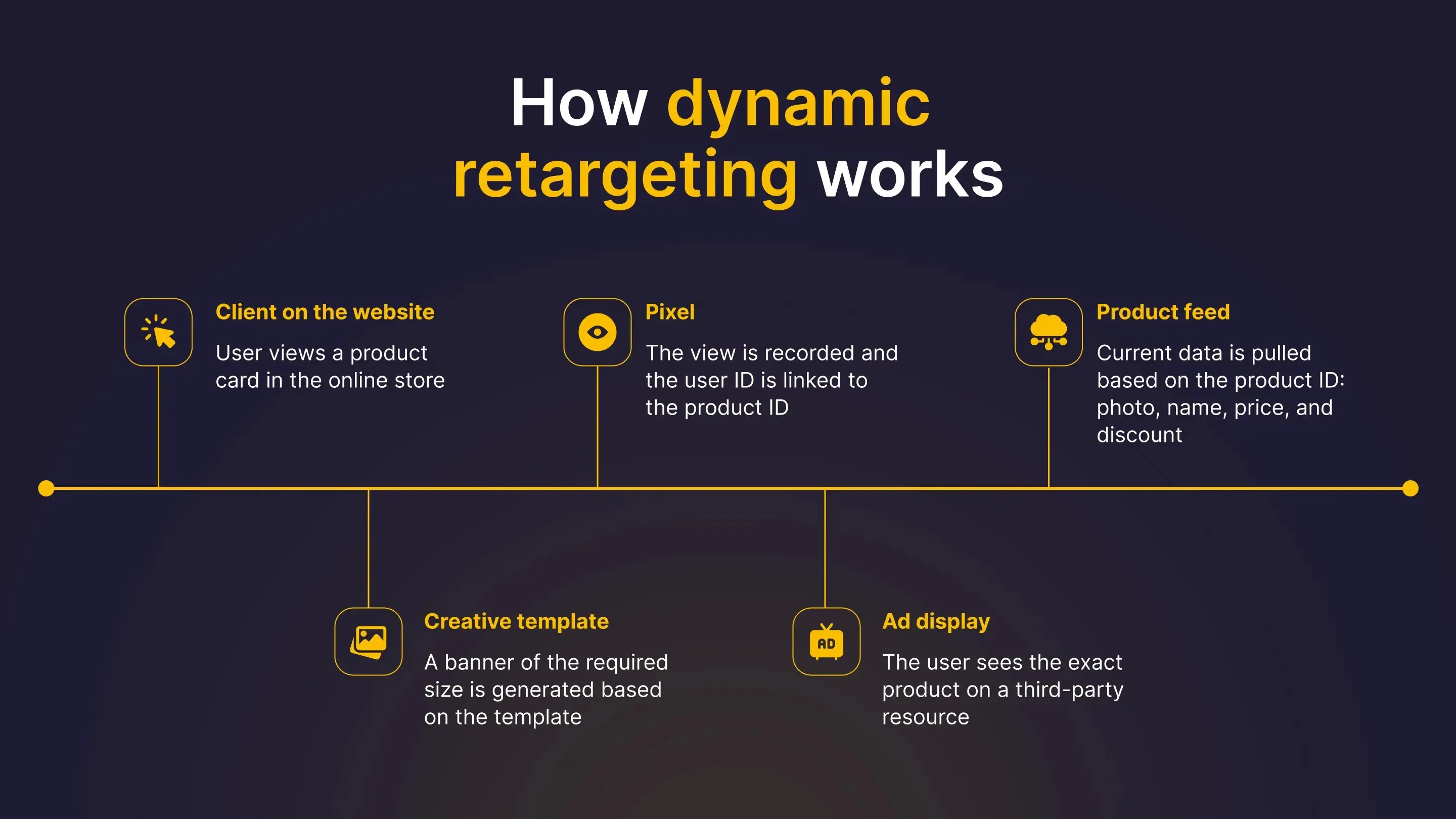
Working together, these three components enable the system to generate relevant, personalized ads in real time. So how is this different from traditional retargeting?
Dynamic vs. traditional retargeting
Both approaches are designed to bring visitors back to your website, but they differ in how ads are created. With traditional retargeting, designers prepare banners in advance for a specific audience segment or promotion. With dynamic retargeting, the platform automatically matches user behavior with product data from your feed and assembles a personalized ad at the moment it's served.
Pre-launch checklist: what to verify before your campaign goes live
Dynamic retargeting is highly automated, which means even small technical issues can quickly scale along with your campaign. If your tracking pixel sends incorrect product IDs or your product feed contains outdated prices, the system will continue serving inaccurate ads while steadily spending your budget.
Before launching your campaign, verify each of the following components to ensure everything works as intended.
1. Pixel and event setup
Installing a basic tracking code is not enough—it only tracks general page visits. Dynamic retargeting requires event-specific data.
To streamline this process, we built the Fusify Pixel, which collects precise behavioral data without complex manual integrations.
At a minimum, make sure your pixel tracks these key events:
- Product view. Logs the specific product detail page opened by the user.
- Add to cart. Isolates high-intent shoppers into a high-priority audience segment.
- Purchase. Excludes converted buyers immediately to avoid wasting ad spend.
If your pixel tracks page visits without passing specific Product IDs, the system won't know which items to display in the banner.
2. Product feed
The product feed determines what appears inside your ads, including product names, prices, availability, and images. If the feed contains inaccurate or outdated information, those errors will appear directly in your campaigns.
Before launching, review three critical areas:
- Update frequency. Ensure your feed syncs automatically with your site inventory. Manual uploads lead to ads showing items that are out of stock or incorrectly priced.
- Data completeness. All required attributes must be populated. Missing values often trigger ad rejection during moderation.
- URL and media integrity. Destination links must point to live product pages, and image URLs must be accessible and crawlable by ad servers.
A typical product feed includes attributes like these:
3. Prepare your product images
Dynamic retargeting platforms automatically build ads using the images provided in your product feed. They can't crop, retouch, or optimize those images during ad delivery, so it's worth checking a few basics before launching your campaign.
- Consistent aspect ratios. Vertical product photos will not render properly in square ad units without awkward cropping or letterboxing.
- Clean, neutral backgrounds. White or neutral backgrounds ensure products remain sharp and legible across all display sizes.
- Uniform product framing. If products are shot at drastically different distances, multi-product carousel grids will look unpolished and uneven.
How creative optimization works
The platform automatically combines products from your feed into dozens of banner variations designed for different ad sizes.
Within each placement, it continuously tests multiple creative combinations, measuring click-through rates and conversions. Over time, the best-performing variations receive more traffic, while underperforming versions are automatically phased out.
Testing this many creative combinations manually would be virtually impossible.
The quality of the final ads depends heavily on the photography used in your catalog.
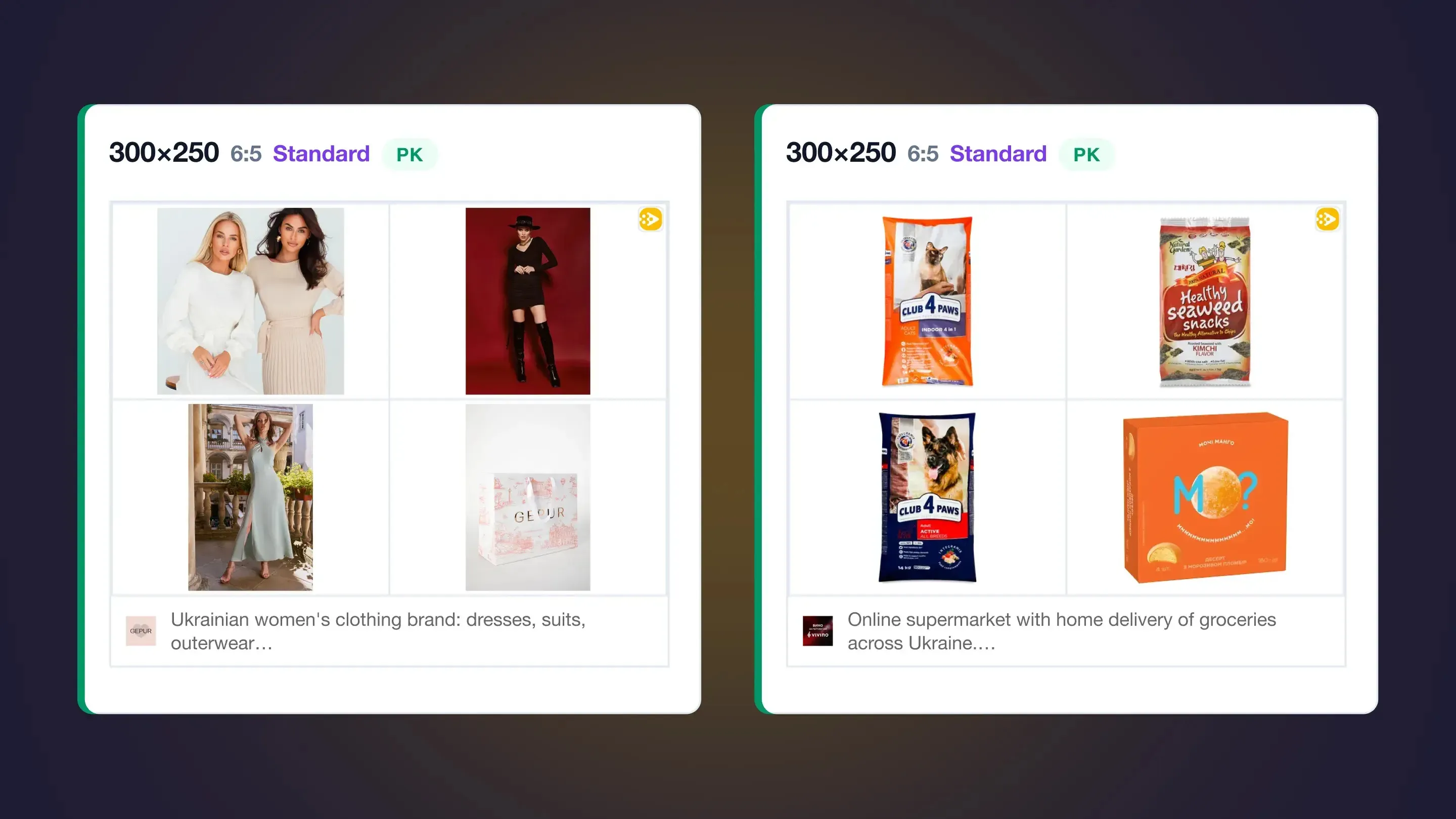
For instance, lifestyle lookbook photography (like Gepur) maintains consistent framing, but varying backgrounds (studio, interior, outdoor) make the banner feel more like a brand showcase than a product showcase. Conversely, studio product shots on a plain white background (like Silpo) keep user attention strictly focused on the items offered.
4. Product and audience segmentation
Running dynamic retargeting across an entire product catalog at once is a common mistake.
To maintain profitability, segment your catalog by price tiers and categories. For example, retargeting low-margin accessories or cheap consumables rarely makes sense—the cost-per-click will quickly exceed the product's profit margin. Establish a minimum price threshold for retargeting and filter out low-ticket items that cannot absorb acquisition costs.
5. Exclusion rules
Consider a store selling women’s lingerie. A review of their site analytics reveals the following distribution:
While Android accounts for two-thirds of site traffic, nearly all revenue comes from the smaller iPhone segment.
However, most iPhone users browse via Safari, where ITP restrictions wipe third-party cookies quickly. Consequently, standard web retargeting fails to track those users, leaving the system to spend its budget primarily on the trackable Android audience—which rarely buys.
In this scenario, dynamic web retargeting wastes money on non-converting traffic while missing high-value buyers entirely. A better alternative here is contextual targeting, which operates independently of browser cookies and delivers consistent reach across all environments.
Allocate budget based on where actual conversions originate, not where raw traffic volume sits.
At a minimum, exclude these audiences:
- Existing customers. Anyone who has already completed a purchase should be removed from your retargeting audience as soon as the purchase event is recorded.
- Devices with consistently low conversion rates. As in the Safari example, not every traffic source contributes equally to revenue.
- Regions that generate little or no sales. If most orders come from only a handful of locations, spending budget elsewhere may deliver little return.
6. Choose the right retargeting window
A retargeting window defines how long an ad follows a user after they visit your site or abandon a cart. For example, with a 7-day window, ad delivery stops on day 8.
The ideal duration depends on your buying cycle.
For lower-priced or impulse purchases—such as clothing, accessories, or beauty products—a window of three to seven days is usually sufficient. After that, users have often either completed their purchase elsewhere or lost interest altogether.
Higher-priced or more considered purchases typically require more time. Products such as furniture, electronics, or premium appliances may benefit from a 14- to 30-day retargeting window, giving buyers enough time to research and compare options before making a decision.
Why launch dynamic retargeting with Fusify
Fusify processes over 300 billion ad requests monthly, providing the inventory depth needed to reach high-intent audiences at the exact moment they are ready to buy. With 10+ years of experience across Ukraine, Turkey, and Brazil, we manage more than 1,000 active campaigns every month.
Instead of relying on multiple disconnected tools, Fusify brings every essential retargeting capability into a single platform.
- Fusify Pixel. Captures precise user actions and abandoned cart data directly—no third-party dependencies or technical overhead.
- Automated optimization and 30+ metrics. Built-in algorithms pause weak ad variations automatically, while our reporting dashboard gives you end-to-end transparency across every funnel stage.
- Post-click and post-view attribution. Tracks conversions from both direct clicks and view-through impressions, revealing the true impact of display touchpoints.
- Dedicated 24/7 support. Our technical team handles campaign setup, monitoring, and analytics optimization end-to-end.
- Creative lab (no-code builder). An integrated creative suite featuring 30+ rich media formats (3D, carousels, interactive sliders) and AI tools to adapt ads across screens without developer support.
Conclusion
Dynamic retargeting is highly effective, but only when built on clean data and accurate targeting rules. If your current campaigns are spending budget on non-converting traffic—or if you want to set up dynamic retargeting correctly from day one—get in touch with our team. We'll review your setup and help you build a high-ROI campaign structure.
%20(1).png)


.png)
.png)
.png)




.webp)
.webp)
.webp)
.webp)


.webp)

.webp)
.webp)

.webp)
.webp)

.webp)

.webp)

