.svg)






In-App User Acquisition: How to Launch a Campaign Without Burning Your Budget
Mobile apps are where adult, high-spending audiences spend their time — the very people most brands want to reach. Yet many traditional businesses tend to skip this channel, assuming that in-app advertising is overly complicated and only works for mobile games. In reality, launching a campaign here is no harder than on the web. Here's who should test this format and what it takes to get started.

TL;DR
- Mobile games and utility apps attract adult, financially active users. The average mobile gamer is 36 years old, and reaching these audiences through the open web is becoming increasingly difficult.
- Social media is not the in-app channel. While platforms like Facebook and TikTok are technically apps, true in-app advertising refers to independent mobile apps and games. As non-gaming brands gradually enter this space, there is still a valuable opportunity to gain visibility before competition intensifies.
- Launching an in-app campaign is no more complicated than running one on the web. If your goal is to measure traffic and conversions, Google Analytics with properly configured UTM parameters is often all you need.
- Don't judge campaign performance by clicks alone. Pay attention to metrics such as reach, viewability, frequency, and overall audience engagement.
- Interactive rich media and rewarded video show the strongest performance.
- Don't launch across the entire inventory at once. Start with a narrow whitelist, gather data, and expand the list step by step. Contextual targeting doesn't work inside apps.
- Prepare multiple creative variations. In-app audiences are highly diverse, making it difficult to predict which message or design will resonate best before launch.
- Optimization begins after the campaign goes live. Read the metrics against your goal, switch off weak apps, and refresh creatives before they burn out.
Two Parallel Worlds of Digital Advertising
Today's digital advertising operates across two very different ecosystems.
The first is familiar to every marketer: websites, search engines, and social media. This is where most brands invest their advertising budgets, whether they're selling products, promoting services, or building brand awareness.
The second is the in-app ecosystem—mobile games and utility apps. Here, the dominant advertisers are still other apps. Games promote games, fintech apps promote finance apps, and productivity tools advertise similar utilities. Traditional brands have been much slower to enter this space.
The biggest reason isn't technology—it's perception.
Many advertisers still assume that mobile games are primarily used by children or teenagers. In reality, today's in-app audience looks very different.
According to MoPub research, the average mobile gamer is 36 years old. Nearly one-third of players are over 45, while Generation Z accounts for just 14.2% of the audience.
Picture a manager in his forties with a stable income, playing a few levels of his favorite game in the evening. When a new car ad appears in his social feed, he reacts: he checks out the model and the specs, even with no plan to buy right away. If the same ad reached him inside the game, his reaction would be the same.
Middle-aged users visit regular websites less and less. AI Overviews in search are speeding this up by serving the full answer on the results page and cutting publishers off from their usual traffic.
Interestingly, the distinction between these two advertising worlds is already beginning to disappear.
Non-gaming brands are increasingly appearing inside mobile games and utility apps, often through large advertising networks. Many advertisers don't even realize their campaigns are already running in in-app environments—they simply have little control over where their ads appear or which formats are being used.
This is what makes in-app worth it: access to the most financially active audience out there.
We've explored why in-app advertising is becoming an increasingly important acquisition channel in more detail in a separate article.
What Is In-App User Acquisition
Before diving in, it's worth clarifying what in-app actually means, as the term is often used too broadly. Technically, ads shown in apps like Facebook or TikTok could also be classified as in-app advertising because users see them within a mobile application. In practice, however, this creates a contradiction: the same advertiser who says, "In-app isn't the right channel for us," may be allocating a significant share of their budget to Facebook. The reason is simple—social platforms are primarily content feeds, not in-app media in the industry-specific sense. The same applies to YouTube and TikTok.
In the AdTech industry, in-app refers to advertising served across independent mobile app inventory rather than within major social platforms. This includes placements in standalone mobile apps and games, where advertisers can reach users outside walled gardens. Throughout this article, this is the definition of in-app user acquisition we will be referring to.
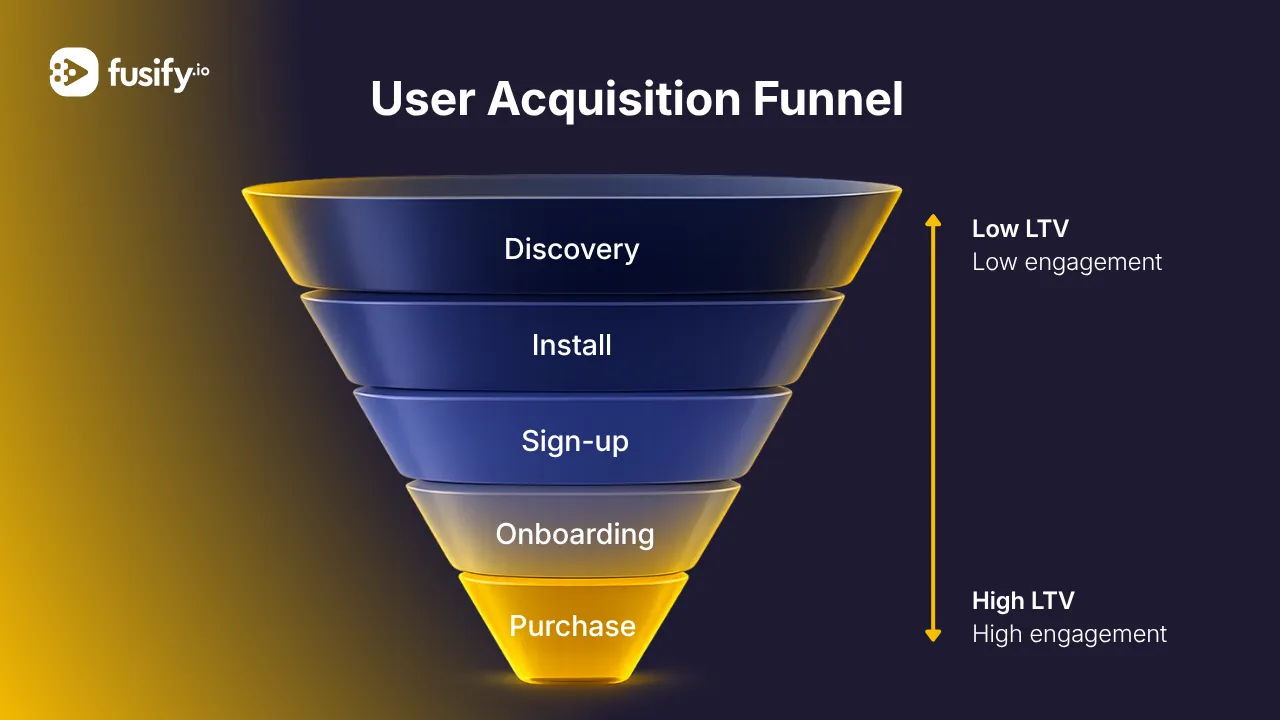
In-app user acquisition is the practice of running advertising campaigns across independent mobile app inventory, including standalone apps and mobile games. Its primary value lies in building brand awareness. Much like traditional display advertising on websites, it helps brands introduce new products, stay consistently visible to their target audience, and reinforce brand recognition through repeated exposure.
What to Understand Before Launching
This environment is significantly different from the traditional web. Several key aspects should be considered already at the planning stage.
- In mobile apps, it is not possible to analyze page text the way it works on websites. Targeting is based on the overall theme of the app itself rather than the content of a specific page.
- Mobile inventory is highly diverse. Among tens of thousands of games and utility apps, audience quality can vary dramatically. Without strict source filtering, there is a high risk of quickly spreading the budget across low-value placements.
- Creatives play a crucial role in campaign performance. Users are usually fully engaged in their activity inside an app, so the advertising message must capture attention instantly to avoid being ignored.
- Campaigns should not be evaluated only by the number of clicks, as website visits are not always the primary goal. The purpose of this type of advertising is to introduce people to a brand or a new product. Moreover, many users are becoming increasingly difficult to reach through traditional websites because they spend more time within other digital environments.
Step 1. Define Your Goal and Relevant Metrics
This is where the practical work begins. The first step is to define a specific campaign objective. This decision determines the ad formats, measurement metrics, and overall success criteria for the campaign.
For traditional businesses, the primary goal of this channel is usually to increase brand awareness. It focuses on reaching the maximum relevant audience: businesses build brand recognition and reach potential customers where they spend most of their time. This works according to the same principles as display advertising on the web.
The following metrics are commonly used to measure campaign performance:
- total reach of the target audience,
- ad visibility (viewability),
- ad frequency per user,
- completed video views.
Performance campaigns focused on app installs and specific in-app actions also exist. However, this is a separate discipline that is primarily relevant for businesses promoting their own applications. If you are a traditional business entering the in-app space for the first time, start with brand awareness.
One of the most common mistakes marketing teams make is a mismatch between the selected campaign objective and the evaluation metrics. A campaign may be optimized for reach while being judged by the number of downloads. The opposite situation also occurs when a campaign is designed to drive actions, but the team focuses only on click-through rates.
That is why it is essential to define final success criteria before launch and agree on the specific metrics that will be used to measure them.
Step 2. Prepare Analytics and Tracking
Analytics should be set up before the campaign launch. If this step is skipped, there will be no reliable data to optimize the campaign, and any lost information cannot be recovered later.
Let’s clarify right away: complex analytics setups are not always required. Traditional businesses are often advised to use specialized mobile attribution platforms such as AppsFlyer or Adjust. However, these tools are primarily designed for companies promoting their own mobile applications. They can be complex to configure and integrate and require having an app to track. For a car dealership or a retail chain, a dedicated mobile app is usually unnecessary, which makes such tracking solutions redundant.
If your goal is to drive users to your website, standard Google Analytics with properly configured UTM parameters is usually enough. It will record a visit from a mobile app the same way as traffic from any other source and show what users do on the website. We covered how to create UTM tags correctly in our dedicated article about UTM tracking, and how to measure the delayed impact of advertising in our material about post-view and post-click analytics.
The most common mistake at this stage is incomplete tracking setup. Teams often limit tracking parameters to only the campaign and creative names. This is not enough for proper analysis, so make sure to also pass the following parameters:
- the name of the app where the ad was displayed,
- the name of the advertising group,
- the creative name,
- the ad format.
Step 3. Prepare Your Creative Assets
Users typically open a game or utility app with a specific goal in mind, meaning their attention is already fully focused on the in-app experience. If a banner or video fails to capture attention within the first seconds, users will simply scroll past it. Even with high-quality, carefully selected traffic, weak creatives can quickly waste your budget.
This leads to two key rules.
- Prepare a set of creatives, not just one banner.
The in-app audience is highly diverse, and it is almost impossible to predict in advance which creative will perform best. Using a single creative leaves no room for optimization, as there are no alternatives to compare against. Create multiple variations, run tests, monitor performance, and keep only the top-performing assets in your campaign.
- Choose the format based on your specific objective.
A format that works well for brand awareness may not be effective for driving actions. Creative formats should always align with the campaign goal defined in the first step.
For brand awareness campaigns, rich media and video ads are typically the most effective formats. Their performance largely depends on achieving sufficient ad frequency and visibility, as repeated exposure to a brand is what helps build recognition.
We covered which rich media formats perform best in more detail in our dedicated article about top-performing rich media ad formats.
Step 4. Launch the Campaign
As mentioned earlier, there are two main ways to launch in-app advertising. We include self-serve platforms not as an equal alternative, but to highlight the difference between approaches and show what true in-app advertising through a DSP provides. Below is a brief comparison of both options.
Self-serve platforms (Google, Meta, TikTok)
You work directly within the platform’s advertising interface without intermediaries. This provides an easy start, built-in optimization algorithms, and access to the platform’s own data.
The main drawback is that self-serve platforms essentially keep you within their own ecosystems rather than providing access to the broader in-app environment. You are limited to the standard ad formats available on the platform and the list of apps where your ads can appear.
Programmatic through a DSP (Fusify approach)
This approach has a higher entry barrier, but it gives you full control over all stages described in the previous steps. The platform provides access to dozens of independent traffic sources, app-level analytics, custom interactive ad formats, and built-in fraud protection.
Step 5. The Main Work Begins After Launch
The effort invested in analytics setup and building a diverse creative library pays off at this stage. Without reliable data and multiple creative variations, there will be no real opportunities for campaign optimization.
Turn off underperforming apps on time
As soon as the first performance data becomes available, remove sources that generate impressions without delivering meaningful results.
Expand your whitelist gradually
Once the initial app list demonstrates positive results, add new, similar placements in small batches. This allows you to evaluate the performance of each new source before scaling further.
Refresh creatives instead of reducing ad frequency
Meta research shows that ad fatigue happens at the creative level — users become tired of seeing the same visual repeatedly. That is why replacing the banner with a new creative is often more effective than simply reducing impression frequency.
The key rule at this stage is that any conclusions require enough time and data to build reliable statistics. Avoid making chaotic campaign changes based on short-term fluctuations during the first few days.
How Fusify Approaches In-App Advertising
Everything covered in this guide forms the foundation of how we work with in-app traffic. For traditional businesses, we already have everything in place: integrations, end-to-end analytics, and familiar performance metrics. You do not need to learn new tools — campaigns in mobile apps are launched and measured as clearly as traditional web advertising.
- We support campaigns at every stage. Together, we select placements, develop creatives, define objectives, and then manage the campaign to achieve results. You receive full access to analytics, with data validated through independent Gemius verification. Fusify delivers high visibility rates — our average viewability reaches 88%, compared to the market average of 30%.
- We understand mobile app audiences: their gender, age, and even specific interests. This means your campaign does not reach “everyone” — it reaches the people who are most relevant to your brand.
- Our engineers continuously work on protecting campaigns from fraud and artificial installations. We use verified whitelists with more than 10 billion monthly impressions and adjust app selections together with you to maintain traffic quality.
- Our library includes more than 30 rich media formats, and we continuously improve the technical side of campaign execution.
- For us, results matter — and the fact that most of our clients come through recommendations proves this approach. We evaluate performance based on your specific KPIs. Campaigns can include split testing, incrementality measurement, and post-view and post-click analytics to assess delayed conversions and the real contribution of advertising, as we explained in detail in our dedicated article about post-view and post-click analytics.
Contact us to discuss your brand’s goals and test the capabilities of our ecosystem with real campaigns.
Conclusion
Mobile apps are a powerful advertising channel with a financially active adult audience that is becoming increasingly difficult to reach through the web. Entering this channel does not have to be complicated: campaigns follow the same logic as display advertising on websites, and familiar analytics tools are usually sufficient for measurement.
However, the first campaigns rarely deliver strong results without thorough preparation. The market rewards those who consider all aspects of their future campaign before launch.
If you want to launch an effective campaign and reach your target KPIs from the start, get in touch. We will help you build an effective strategy and prepare a media plan.

.png)

.png)
.png)



.webp)
.webp)
.webp)
.webp)


.webp)

.webp)
.webp)

.webp)
.webp)

.webp)

.webp)

